

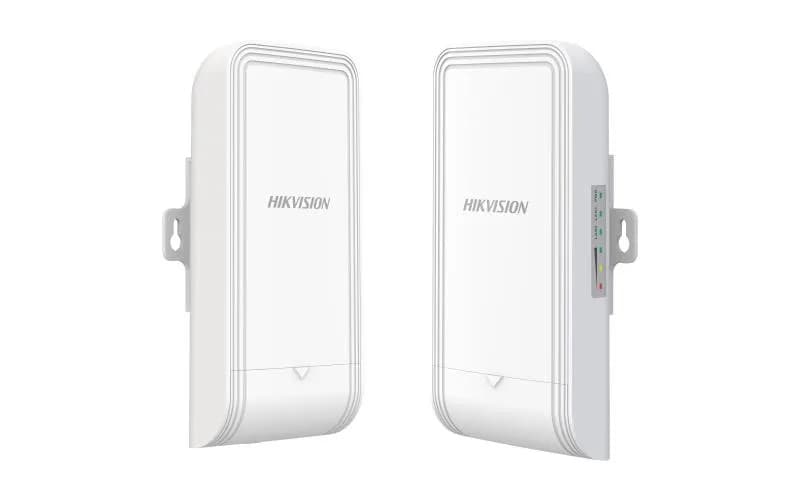
Hikvision DS-3WF02-5AC/D5GHz 867Mbps 5km Wireless Bridge Kit
DS-3WF02-5AC/D — 5GHz 867Mbps 5km Wireless Bridge Kit. Part of the Wi-Fi access points range. Key specs: Product Dimensions (W × H × D) — 90.8 mm × 187.87 mm × 57.87 mm (3.58'' × 7.4'' × 2.28''); Package Dimensions (W × H × D) — 256 mm × 231 mm × 86 mm (10.07" × 9.09" × 3.38"); Net Weight — 0.26 kg (0.57 lb) per device.
- DeliveryDelivery within Tashkent in 1 hour
- WarrantyOfficial warranty
- InstallationFitted by a specialist
Key specifications
- Product Dimensions (W × H × D)
- 90.8 mm × 187.87 mm × 57.87 mm (3.58'' × 7.4'' × 2.28'')
- Package Dimensions (W × H × D)
- 256 mm × 231 mm × 86 mm (10.07" × 9.09" × 3.38")
- Net Weight
- 0.26 kg (0.57 lb) per device
- Gross Weight
- 1.1 kg (2.43 lb)
- Packing List
- Wireless Bridge × 2,PoE Power Supply × 2,AC Cord × 2,Quick Start Guide ×1,Regulatory Compliance and Safety Information × 1,Binding Tape × 4
| Product Dimensions (W × H × D) | 90.8 mm × 187.87 mm × 57.87 mm (3.58'' × 7.4'' × 2.28'') |
|---|---|
| Package Dimensions (W × H × D) | 256 mm × 231 mm × 86 mm (10.07" × 9.09" × 3.38") |
| Net Weight | 0.26 kg (0.57 lb) per device |
| Gross Weight | 1.1 kg (2.43 lb) |
| Packing List | Wireless Bridge × 2,PoE Power Supply × 2,AC Cord × 2,Quick Start Guide ×1,Regulatory Compliance and Safety Information × 1,Binding Tape × 4 |
| Packing Method | Packing in pairs |
| Working Temperature | -30 °C to 65 °C (-22 °F to 149 °F) |
| Working Humidity | 5% to 95% (no condensation) |
| Storage Temperature | -40 °C to 80 °C (-40 °F to 176 °F) |
| Storage Humidity | 5% to 95% (no condensation) |
| Installation Mode | Pole Mounting |
| Ingress Protection | IP55 |
| Power Consumption | 2.43 W for typical (1-ch 2MP IPC), Max. 3.6 W |
| Max. Transmission Rate Of Air Interface | ≤ 867 Mbps |
| Wireless Standard | IEEE 802.11/a/n/ac |
| Working Frequency Band | 5150 MHz ~ 5250 MHz,5250 MHz~ 5350 MHz,5470 MHz~ 5725 MHz,5725 MHz~ 5825 MHz,(Note: Available channel may vary with local regulations.) |
| Antenna Gain | 12 dBi |
| Antenna Angle | (H) Beamwidth [3 dB] 35°, (V) Beamwidth [3 dB] 35° |
| Transmitting Power | 22 dBm @11ac MCS0 (Note: Transmitting power may vary with local regulations.) |
| Receiving Sensitivity | -84 ±2dBm@AC80-MCS0 |
| Throughput Rate | PTP: 90 Mbps/0.5 KM(AC80),90 Mbps/1 KM(AC80),40 Mbps/5 KM(AC80),PTMP(1 to 4): 80 Mbps/1 KM(AC80) |
| Network Interface | 2 × 10/100 Mbps RJ45 ports |
| LED Indicator | Power indicator,LAN indicator,Signal intensity indicator |
| Reset | Hardware resetting button |
| Power Supply | 48V PoE/12~24V DC;Check the physical interface image below for more details. |
| Application Function | IFM,IPM,DFS,TPC |
| Channel Width | 20/40/80 MHz |
| Channel Selection | Auto/manual selection |
| Security Mode | WPA2-PSK |
| Security Mechanism | Wireless network name hidden |
| Network Protocol | NTP (network time synchronization),SADP (auto search for IP address), HTTPS/HTTP (web management),SSH (debugging) |
| Management Method | HCP,Web,iVMS-4200,HPP |
| System Log | Syslog,Control center information |
| Upgrade | Web,iVMS-4200,HCP,HPP |
| HPP | Support one-click activation and remote management via Hik-Partner Pro. Functions supported: 1. Reboot device 2. Restore device 3. Display the topology information 4. Display the connection status between AP and CPEs, including signal intensity, background noise, sending & receiving rate 5. Configure wireless settings, including working mode, SSID, password, channel, channel bandwidth, transmitting power 6. Bridge alignment 7. Spectrum scanning 8. PoE output management |
| PoE Port | AP: LAN1 802.3af/at PoE IN; CPE: LAN1 passive PoE IN, LAN2 802.3 af PoE OUT |
| PoE Power Budget | 10 W |
| PoE Distance | 100 m |
| EMC | CE-EMC(EN 55032, EN 55035, EN 61000-3-2, EN IEC 61000-3-2, EN 61000-3-3, EN 50130-4), IC(ICES-003, Issue 7) |
| Safety | CB (IEC 62368-1),CE-LVD (EN 62368-1) |
| Chemistry | CE-RoHS (2011/65/EU),WEEE (2012/19/EU),Reach (Regulation (EC) No.1907/2006) |
| Radio | EN 301 893,EN 300 440,EN 62311,EN 301 489-3,EN 301 489-17,EN 301 489-1, EN 55032, EN 55035, , EN 61000-3-2, EN IEC 61000-3-2, EN 61000-3-3, EN 50130-4, EN 50385, EN IEC 62311, EN 62368-1 |
Data comes from official Hikvision and other manufacturer documents and may differ after model updates.
DS-3WF02-5AC/D — 5GHz 867Mbps 5km Wireless Bridge Kit. Part of the Wi-Fi access points range. Key specs: Product Dimensions (W × H × D) — 90.8 mm × 187.87 mm × 57.87 mm (3.58'' × 7.4'' × 2.28''); Package Dimensions (W × H × D) — 256 mm × 231 mm × 86 mm (10.07" × 9.09" × 3.38"); Net Weight — 0.26 kg (0.57 lb) per device.
IP55-rated housing — fit for outdoor walls, canopies and unheated warehouses. Powered over PoE: one cable, no power adapter or socket needed.
From the official Hikvision distributor: genuine product, official warranty and paperwork. Wholesale pricing for dealers and projects.
Frequently asked questions
Retail price is 1,070,000 UZS. Dealers, installers and multi-unit orders get a separate quote: send the quantity on Telegram (@Hikvisionnuz) or call +998 95 252 22 22.
We are the official Hikvision distributor: every unit has a serial number on the box and housing that can be checked with Hikvision, and it ships with an official warranty card.
It is in stock. Within Tashkent we deliver the same day, usually within an hour; regions get it by courier in 1–3 days.
Companies agree payment terms and paperwork with a manager on +998 95 252 22 22. Individuals pay in cash, Uzcard, Humo, Click or Payme.